Basic Knowledge for Illustrators 02: “DTP Software and Fonts”
- MORI Ryuichiro

- May 13
- 9 min read
(I am writing based on the circumstances of the Japanese illustrator industry. )
■ What Is DTP?
The first company I joined after graduating from university was a small printing company.
At the time, I had absolutely no intention of becoming an illustrator. I joined that printing company simply because, after applying to dozens of different companies, it was the only one that accepted me.I had been rejected by almost every company I applied to, and I entered that job reluctantly, still feeling the shock of all those rejections.
However, that printing company would later lead me toward becoming an illustrator. If I had been accepted by another company, I probably would never have become one.
Looking back now, I feel that the obstacles, setbacks, and failures in life may have been a kind of guidance by an invisible hand. It is what Steve Jobs called “connecting the dots.”
At that time, printing required special equipment, complex processes, and the work of many skilled craftspeople.
First—
A designer would specify the typeface, font size, and other details, then send those instructions by fax to a phototypesetting company.
At the phototypesetting company, a skilled operator would use a computerized phototypesetting machine to input the text and expose it onto photographic paper.
The exposed text on photographic paper was called a kami-yaki, or “paper proof.”
Once the paper proofs were ready, the phototypesetting company would deliver them to the design office. They usually delivered them in batches once or twice a day. If something was urgent, someone from the design office would sometimes run over to the phototypesetting company to pick it up.
At the design office, the text would be cut and pasted onto thick paper. Lines such as crop marks would be drawn with a Rotting pen, creating what was called the hanshita, or camera-ready artwork.
Reference page about hanshita : https://karafuneya.com/blog/words/hanshita
That camera-ready artwork would then be taken to a prepress company.
At the prepress company, the camera-ready artwork would be photographed with a process camera to create prepress films.
From that prepress film, printing plates—something like stamps used for printing—would be made.
Only after the plates were completed could the actual printing finally begin on the printing press.
Today, however—
It has become possible to create print-ready data easily on a single desktop computer.
If you also have a printer, you can even print it yourself.
This is DTP, or Desktop Publishing.
DTP means creating print-ready data on a desktop computer.
DTP gradually spread from the 1990s onward.
By the 2000s, most commercial printing—from flyers and posters to books and magazines—had shifted to DTP.
■ Two Reasons Illustrators Should Have DTP Software
1. To Make a Strong First Impression with Professional-Level Business Cards and Portfolios
If you are a freelance illustrator, business cards and portfolios are essential.
They are what you hand to designers and editors when you meet them for the first time.
If your business card or portfolio looks poorly made, people may think, “This person is still an amateur.”
If their first impression is “still an amateur,” it will almost never lead to work.
First impressions are extremely important.
If you want to create professional-level business cards and portfolios, you need professional DTP software.
Of course, you can also make business cards and portfolios using word-processing software.
However, designers and editors have professional eyes when it comes to printed materials.
They can tell at a glance when professional DTP software has not been used.
No matter what, it tends to look amateurish.
Some people may think, “As long as the artwork is good, the work will come. The design of my business card or portfolio is secondary.”
But think about it.
For example, consider the interior of a Louis Vuitton store.
Top-tier brands make the interiors of their stores and the way they present their products top-tier as well.
That is why they can sell their products at high prices.
A top-tier brand would never neglect store design or presentation by thinking, “As long as the product itself is good, it will sell.”
It is only natural that the product—your artwork—must be good.
But unless the “store”—your business card and portfolio—is also well designed, it will not sell. In other words, work will not come.
If you want to create many good opportunities for work, you should make your business cards and portfolios using professional software.
2. To Accept Both Design and Illustration Work Together
When a request comes from a designer, the designer is the one who handles the design.
But when the request does not come from a designer—
For example:
“When an editor asks you to create a book cover”
“When a company contacts you directly about a booklet, flyer, product label, or similar project”
—there are times when you may be asked:
“Could you handle both the illustration and the design?”
In such cases, if you can accept the job including the design work, the client may think:
“Oh, this person can handle the design as well. That is really helpful.”
This often leads to repeat commissions.
I myself had several editors who repeatedly asked me to design book covers together with the illustrations.
Moreover, design work is often better paid than illustration work.
It is difficult to generalize, but when you accept a book cover job including the design, the fee can be more than double what you would receive for the illustration alone.
To be frank, it is easy for income to remain low if you do illustration only.
If you can also do design, your livelihood becomes overwhelmingly easier.
■ DTP Software Used by Professionals
In professional DTP, three Adobe software products are commonly used:
Adobe Illustrator
Used for designing single-page printed materials
Adobe Photoshop
Used for handling photographic data
Adobe InDesign
Used for designing multi-page printed materials
In the past, software from other companies, such as QuarkXPress and FreeHand, was also used. Today, however, Adobe products have an almost dominant position.
In recent years, competing products have appeared, but many still have weaknesses, such as not supporting vertical Japanese writing or CMYK mode. They are not yet at a level where they can compete on equal terms.
If you are going to prepare your software now, these three Adobe products are the ones to get.
1. Adobe Illustrator
Adobe Illustrator is mainly used for designing single-page printed materials.
It is used for business cards, flyers, leaflets, posters, postcards, and similar items.
The text, lines, shapes, and other elements in single-page printed materials are mostly created using Adobe Illustrator.

Many people also use this software to draw illustrations.
Genki Takada is one representative example.
It is well suited to a crisp, bold style with strong contrast.
However, as drawing software, it has some distinctive characteristics and may feel difficult for beginners to get used to.
Illustrations created in Adobe Illustrator are called vector graphics.
Because straight lines, curves, and fills are drawn using mathematical formulas, the image does not become rough no matter how much it is enlarged.
2. Adobe Photoshop
Adobe Illustrator alone cannot handle photographs.
Many printed materials are made up of photographs, text, and shapes.
Text and shapes are handled in Adobe Illustrator.
Photographic data, on the other hand, is handled in Adobe Photoshop.
In many cases, DTP data for single-page printed materials is created by combining Adobe Illustrator and Adobe Photoshop.
Illustrations created in Photoshop format are also incorporated into DTP data in the same way.
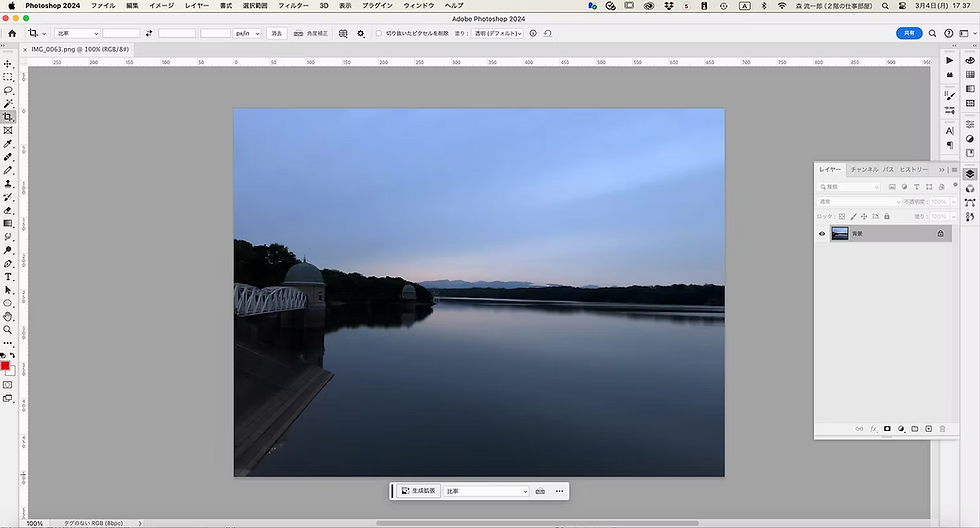
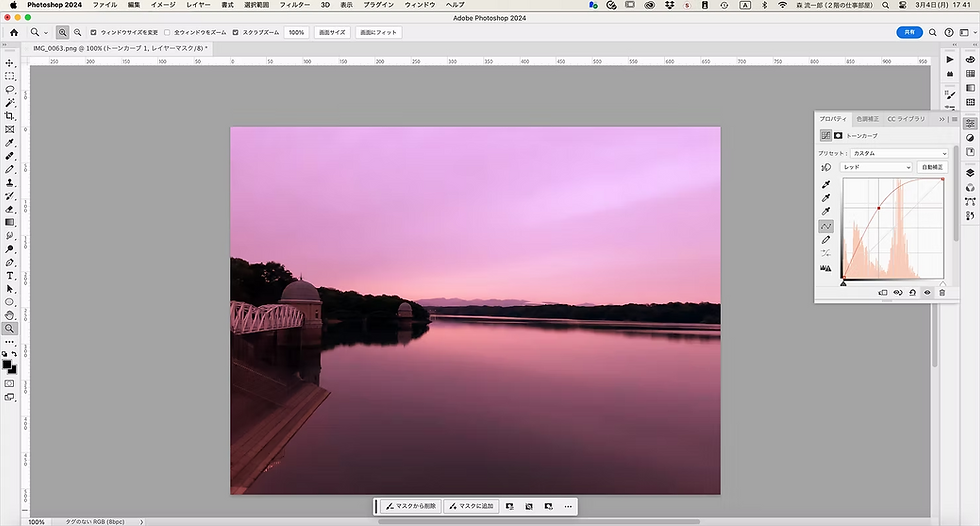
In Adobe Photoshop, it is also easy to adjust the color tone of photographs.
Photoshop also has a wide range of brush tools. When combined with a pen tablet or iPad, it allows you to draw intuitively.
I also used Adobe Photoshop for my own artwork.
Even beginners should be able to draw with it fairly easily.

The brush tools can be customized to suit your preferences.
○ A Complete Guide to Using and Creating Brush Tools
Various brush tools are distributed online. Some are paid.
○ Special Brushes by Kyle T. Webster
○ Free Watercolor Photoshop Brushes
○ Oil Paints Mixer Brush Presets for Photoshop
○ The Ultimate Brush Toolbox
○ 100 Stroke Photoshop Brushes
Illustrations created in Adobe Photoshop are called raster graphics.
When enlarged greatly, you will see square, tile-like areas of color.
The image is made up of many small tile-like color areas gathered together.
For that reason, if you enlarge it too much, the image quality becomes jagged.

Raster graphics are not suitable for enlargement.
However, recently it has become possible to compensate for this to some extent using AI, or artificial intelligence, correction.
Illustrations in Photoshop format can also be combined with Adobe Illustrator to become print-ready DTP data.
If you want to learn Adobe Photoshop, see the following:
○ Photoshop Beginner Online Course
○ Photoshop Basics for Beginners
○ What You Can Do with Photoshop! From the Very Basics to Applied Techniques Beginner Course, Video
○ Photoshop Beginner Course: Explaining the Photoshop Interface Lesson 1, Video
3. Adobe InDesign
For multi-page designs such as magazines, books, catalogs, and pamphlets, Adobe InDesign is used. It is layout software capable of handling multiple pages.
If you create just one page, it can also be used for single-page designs.
In simple terms, it feels almost like Adobe Illustrator with multi-page functionality added.
However, it cannot be used as software for drawing illustrations.
Those functions have been omitted.
Because this software cannot be used for drawing, many illustrators do not own it.
However, when you use it to create a portfolio, you can produce something of professional quality.
I recommend purchasing it if possible.
If you want to learn Adobe InDesign, see the following:
○ Learn InDesign
○ Adobe InDesign Beginner’s Guide
○ InDesign Basic Operations for Beginners, Video
○ How to Use InDesign 01For InDesign Beginners Who Want to Become Work-Ready, Video
■ How to Purchase Adobe Products
If you want to get all three of these products, Adobe Creative Cloud is probably the best option.
Adobe Creative Cloud is a subscription plan that gives you unlimited access to more than 20 Adobe software applications.
To be honest, you probably do not need more than 20 apps.
I myself only use Acrobat Pro and Premiere Pro for video editing a little.
I have never used most of the apps.
Even so, it is cheaper than purchasing the three applications individually.
If you purchase Adobe Creative Cloud from the official Adobe website, it costs 7,780 yen per month, tax included.
That is fairly expensive.
Buying a one-year license from Amazon is slightly cheaper.
There are also occasional sales.
It is a good idea to add this product to your Wishlist.
If you add it to your Wishlist, Amazon will notify you when it goes on sale.
If you buy it during a sale, it is fine to start using it at any time.
Even if the one-year period for the product you purchased from Amazon has not yet expired, it can be worthwhile to buy another license when the price is low.
If you are still a student, there is also a student discount.
Adobe Creative Cloud Student Plan
Even if you are already working, I have heard that you may be able to qualify for the student discount by taking certain online school courses.
You can learn how to use the software as well, so it is a very good deal.
For details, see: “Don’t Miss Out: How to Buy Adobe CC Cheaply—The Academic Version Is the Lowest Price!”
If your budget is really limited, Adobe Illustrator and Adobe Photoshop alone may be enough.
You can create your portfolio one page at a time in Adobe Illustrator.
That way, you can manage even without owning Adobe InDesign.
If you purchase Adobe Illustrator and Adobe Photoshop from the official website, each cost 2,728 yen per month, tax included.
Together, they cost 65,472 yen per year.
That is still expensive.
If you purchase the set from Amazon, it is a little cheaper.
It costs 49,920 yen for one year.
It seems that it may become a little cheaper during sales.
You may want to add this to your Wishlist as well.
However, when purchasing the set from Amazon, Adobe Fresco is not included.
If you purchase Adobe Photoshop from the official Adobe website, Adobe Fresco is included.
Adobe Fresco is highly recommended as drawing software.
If you also want this software, it may be better to purchase from the official Adobe website.
Alternatively, you could purchase a one-year Adobe Creative Cloud license from Amazon.
■ Fonts
Fonts are indispensable for DTP.
A font is a set of typefaces with the same design.
Computers come with a reasonable number of built-in fonts.
○ Fonts Built into macOS Ventura
○ Windows 11 Font List
But if you want to create business cards and portfolios that feel more like you, you will probably want to use a wider variety of fonts.
If you purchase Adobe Illustrator or Adobe Creative Cloud, Adobe Fonts is also included.
This is a collection of more than 20,000 fonts.
It also includes more than 500 Japanese fonts.
Unless you are doing full-scale graphic design work, that should be more than enough.
When DTP first began in Japan, a single font could cost tens of thousands of yen. Considering that, the monthly fee for Adobe Creative Cloud may not feel quite so expensive.
If you are going to do full-scale graphic design work, it would be good to acquire even more fonts, although that will cost money.
------------------------------------------------------------
If you liked this article, please click the heart mark below.


Comments